Book an Appointment
Call South Jordan Computer Repair Service at 
801-679-2640
                   

(801) 679-2640

*


South Jordan Computer Repair Service has provided the best mobile computer repair in South Jordan, UT and the greater Salt Lake City Metro Area since 1999. The term "mobile computer repair" means we come to you to resolve all your computer problems.

We repair laptops, desktops, PCs and Apple computers. One of our highly qualified staff will come to you, often the same day, to take care of all your repair needs.

Why not use the #1 rated company for computer repair in South Jordan, UT?

Computer Repair 4.9 / 5 stars from 289 reviews
Why use a computer tech when you can have a South Jordan based Computer Engineer? Mon-Sun 8:00am - 8:00pm

Call us at (801) 679-2640

Text us at (801) 679-2640

Email us your questions

Book an Appointment

"Jason was courteous, knowledgeable and efficient in his work. He resolved problems with both of my laptops. The work was completed in a timely manner and charges were quite reasonable."
South Jordan Computer Repair Service 5 / 5 stars
"Matt did a great job, solved a number of my issues , would recommend him and the company."
South Jordan Computer Repair Service 5 / 5 stars
"Ben is great at what he does. He was able to find out my problem within minutes. Great service and highly recommended!!!!"
South Jordan Computer Repair Service 5 / 5 stars
"Taylor was most helpful. Thorough and knowledgeable, 5 stars all the way."
South Jordan Computer Repair Service 5 / 5 stars
"I had the greatest experience with the technician. My computer is running better than it ever has. I had to get a new hard drive and he was able to ensure all my files came over and I did not lose anything. I am 1000% satisfied. He was awesome. He was very knowledgeable and personable. I would give him 100 stars."
South Jordan Computer Repair Service 5 / 5 stars

Who is South Jordan Computer Repair Service?

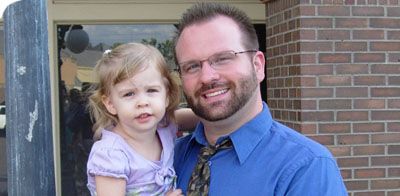
South Jordan Computer Repair Service is owned by Matt Karls, an Electrical Engineer and a Computer Systems Engineer. We are a team of computer professionals focused on service and quality, all our work is guaranteed.

If you have any computer, technology or IT problem in South Jordan, UT we can fix it. We have been performing computer repair in South Jordan full time since 1999. Feel free to give us a call or text us at (801) 679-2640.

South Jordan Computer Repair Service's Computer Engineer

What is your Service Area for on-site Computer Repair?

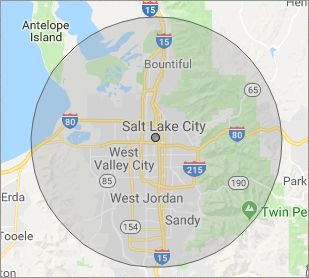
Our primary on-site mobile service areas include the greater Salt Lake City metropolitan area and the Phoenix, Tucson, Las Vegas and San Diego metro areas.

We provide remote and mobile computer repair in South Jordan, Bluffdale, Bountiful, Centerville, Cottonwood Heights, Draper, Farmington, Herriman, Holladay, Kearns, Magna, Midvale, Millcreek, Murray, North Salt Lake, Riverton, Salt Lake City, Sandy, South Salt Lake, Taylorsville, West Valley City and Woods Cross.

Our on-site Computer Service Area

What should someone expect that hires you for Computer Service?

Our mission is to fully resolve your computer problems quickly and affordably. If you want a Computer Engineer that can fix all of your computer problems instead of a computer tech, a computer geek, a technician or a computer guy that can only fix some of your problems; call us at (801) 679-2640.  

What types of Computer Services do you perform?

We service businesses and business clients in their homes, including:
 
  • Diagnose / repair hardware or software problems
  • Spyware, malware, trojan and virus removal
  • Setup wireless and small business networks
  • Laptop repair, PC repair and Apple repair
  • Hard drive data recovery

South Jordan Computer Repair Service Contact Information

South Jordan Computer Repair Service
(801) 679-2640

South Jordan Computer Repair Service is a Karls Technology company

* *
*
*
*
  *
* *


*
*
* * * * * * * * * * * * * * *
4.9 / 5 stars from 289 reviews

"I had a major computer failure that I couldn't resolve. As it might have been a hardware conflict, I wanted a tech to check out the system at home with everything connected. Taylor came out actually ahead of schedule, ran the diagnostics and the issue was resolved. I couldn't be happier with the service and professionalism. Thank you."

South Jordan Computer Repair Service 5 / 5 stars

"Matt was excellent. He explained my problems in a way I could understand and fixed them all! I would highly recommend this computer company."

South Jordan Computer Repair Service 5 / 5 stars

"Excellent, all is working, thank you."

South Jordan Computer Repair Service 5 / 5 stars

"Ben came out to help us with our laptop after we had an issue with a virus and he was very helpful and informative on the matter. He was very respectful and kind in our home. Glad we put our trust in him, would recommend to friends and family!"

South Jordan Computer Repair Service 5 / 5 stars
Best Antivirus Software of 2026: The Ultimate Guide to Cybersecurity Brands

In 2026, the digital threat landscape has shifted. We are no longer just fighting simple viruses; we are defending against AI-generated phishing, sophisticated ransomware-as-a-service, and complex identity theft. Choosing the right antivirus brand is no longer optional—it is the foundation of your digital life. At Karls Technology, we’ve analyzed the top-performing security suites of the […] The post Best Antivirus Software of 2026: The Ultimate Guide to Cybersecurity Brands appeared first on Computer Repair Blog.

Network Card Disconnects You from Wi-Fi

If your computer keeps disconnecting from your Wi-Fi network, but other devices can connect just fine, it may be that the network card in your computer is not receiving enough power. A network card is a piece of hardware that connects computers in a network. Windows includes an energy-saving mode that immediately lowers network card […] The post Network Card Disconnects You from Wi-Fi appeared first on Computer Repair Blog.

Update Google Chrome Now

Another urgent notice has been sent by Google to all users. Now is the time to check that you are using the most recent version of the Chrome browser. Since a zero-day vulnerability has been discovered, there is a heightened sense of urgency. The current critical situation necessitates that all users double-check their Windows computers […] The post Update Google Chrome Now appeared first on Computer Repair Blog.

Stop Applications From Starting Automatically

After being installed, certain programs will operate in the background on occasion. Even while it works for a few apps, its overall performance is poor. System performance drops when a large number of apps are set to launch automatically. For optimal speed, unnecessary programs during startup should be disabled. The good news is that Windows […] The post Stop Applications From Starting Automatically appeared first on Computer Repair Blog.

Solid-State Buttons on Upcoming iPhones? Maybe!

Next year, the volume and power buttons on the iPhone 15 Pro and Pro Max might be changed to solid-state buttons instead of being able to be pressed down. The Home button of the iPhone 7 was the first to be made entirely out of a solid-state component. This allows thumbprints to be the way […] The post Solid-State Buttons on Upcoming iPhones? Maybe! appeared first on Computer Repair Blog.

Windows OS is Unresponsive – Fast Startup

Turning off this feature could be the quickest and easiest approach to solve this problem. The useful function known as “Fast Startup” maintains your Windows OS in the hibernation mode so that it does not need to be completely relaunched after it has been shut down. This results in a significantly quicker reboot. Even though […] The post Windows OS is Unresponsive – Fast Startup appeared first on Computer Repair Blog.

Lockdown Mode Now Available

Lockdown Mode is a new security option available to iPhone and iPad owners in iOS 16 and iPadOS 16. Its purpose is to safeguard users from attacks launched by privately-held firms developing government-sponsored spyware. In July, when it was still in beta, we let our readers know about it. You can now obtain it. Users […] The post Lockdown Mode Now Available appeared first on Computer Repair Blog.

Microsoft Warns Loss of Data

Recently discovered problems with rebooting virtual drives through the Server Manager control panel have been acknowledged by Microsoft, and the company has issued a warning to that effect. According to Bleeping Computer, this vulnerability might cause data corruption if administrators try to reset (or clean) a virtual drive and accidentally reset the wrong disk. Errors […] The post Microsoft Warns Loss of Data appeared first on Computer Repair Blog.

Turn off Fluent Design to Increase Performance

Windows 10 has a lot of visual effects, like animations, shadows, and more advanced effects, which are part of the Fluent Design language on Windows 10. The Fluent Design, while creates a more modernized look, could slow down your computer. Thankfully, you can turn these effects off, though, to make Windows 10 feel faster. In […] The post Turn off Fluent Design to Increase Performance appeared first on Computer Repair Blog.

Remote Desktop Not Working? Here May Be Why (KB5019980)

Microsoft acknowledged many problems with Windows 11 recently, including that the Remote Desktop software may not be working properly. What is Remote Desktop? After installing a program called “Remote Desktop,” it’s easy to establish connections with other computers. It’s a convenient way to transfer data or offer technical support from one computer to another. In […] The post Remote Desktop Not Working? Here May Be Why (KB5019980) appeared first on Computer Repair Blog.